Fork me on GitHub

Vue slot实例

如何理解slot

如何理解Vue.js的组件中的slot? Jasin Yip的回答

slot 有点类似面向对象思想中的「多态」,比如要实现一个这么 Alert 组件:
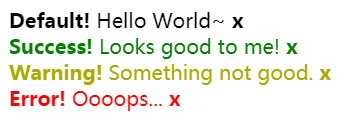
<slot> 就是外部调用时,标签中的内容。如果外部调用时没有提供内容的话,那么它就会使用自己默认提供的内容,非常方便。

使用组件:

1
2
3
4
5
6
7
8
9
10
11
12
13
14
<div id="app">
<alert></alert>
<alert type="success">
<strong>Success!</strong> Looks good to me!
</alert>

<alert type="warning">
<strong>Warning!</strong> Something not good.
</alert>

<alert type="error">
<strong>Error!</strong> Oooops...
</alert>
</div>

构造组件:

1
2
3
4
5
6
7
8
9
10
11
12
13
14
15
16
17
18
19
20
21
22
<style>
.Alert__close {
font-weight: bold;
cursor: pointer;
}
.Alert--Success {
color: green;
}
.Alert--Warning {
color: #aa0;
}
.Alert--Error {
color: red;
}
</style>

<template id="alert-template">
<div :class="alertClasses" v-show="show">
<slot><strong>Default!</strong> Hello World~</slot>
<span class="Alert__close" @click="show = false">x</span>
</div>
</template>

1
2
3
4
5
6
7
8
9
10
11
12
13
14
15
16
17
18
19
20
21
22
Vue.component('alert', {
template: '#alert-template',
props: ['type'],
computed: {
alertClasses: function () {
return {
'Alert--Success': this.type === 'success',
'Alert--Warning': this.type === 'warning',
'Alert--Error' : this.type === 'error'
}
}
},
data: function () {
return {
show: true
};
}
});

new Vue({
el: '#app'
});

作用域插槽

作用域插槽是一种特殊类型的插槽,用作一个 (能被传递数据的)可重用模板,来代替已经渲染好的元素。

slot-scope 用于

在子组件中,只需将数据传递到插槽,就像你将 prop 传递给组件一样。
在父级中,具有特殊特性 slot-scope 的 <template>元素必须存在,表示它是作用域插槽的模板。slot-scope 的值将被用作一个临时变量名,此变量接收从子组件传递过来的 prop 对象。

1
2
3
<div id="app">
<parent></parent>
</div>
1
2
3
4
5
6
7
8
9
10
11
12
13
14
15
16
17
18
19
20
Vue.component('child',{
template: '<div class="child">\
<slot text="hello from child"></slot>\
</div>'
})

Vue.component('parent', {
template: '<div class="parent">\
<child>\
<template slot-scope="props">\
<span>hello from parent</span>\
<span>{{ props.text }}</span>\
</template>\
</child>\
</div>'
})

new Vue({
el: "#app"
})

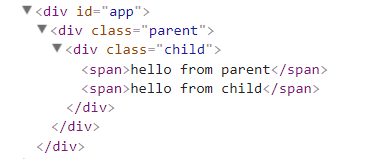
渲染结果:

slot-scope 可用于任意元素

作用域插槽更典型的用例是在列表组件中,允许使用者自定义如何渲染列表的每一项:

1
2
3
4
5
6
7
8
9
10
<div id="app">
<my-awesome-list :item="items">
<li
slot="item"
slot-scope="props"
class="my-fancy-item">
{{ props.text }}
</li>
</my-awesome-list>
</div>
1
2
3
4
5
6
7
8
9
10
11
12
13
14
15
16
17
18
19
20
21
22
23
24
25
26
27
28
29
30
31
32
33
34
Vue.component('my-awesome-list',{
template: '<ul>\
<slot name="item"\
v-for="item in items"\
:text="item.text">\
备用内容\
</slot>\
</ul>',
data: function () {
return {
items: [
{text: "111"},
{text: "222"},
{text: "333"}
]
}
}
})

new Vue({
el: "#app",
data: {
items: [
// {text: "111"},
// {text: "222"},
// {text: "333"}
]
},
methods: {
incrementTotal : function () {
this.total += 1
}
}
})

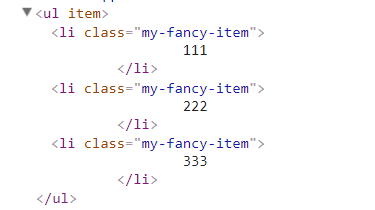
渲染结果: